

I Used ChatGPT, Claude, and Gemini Every Day for a Month. Here's What I Learned
A first-person diary of using ChatGPT, Claude, and Gemini every day for a month in 2026, with honest takes on which won at thinking, writing, coding, and convenience.
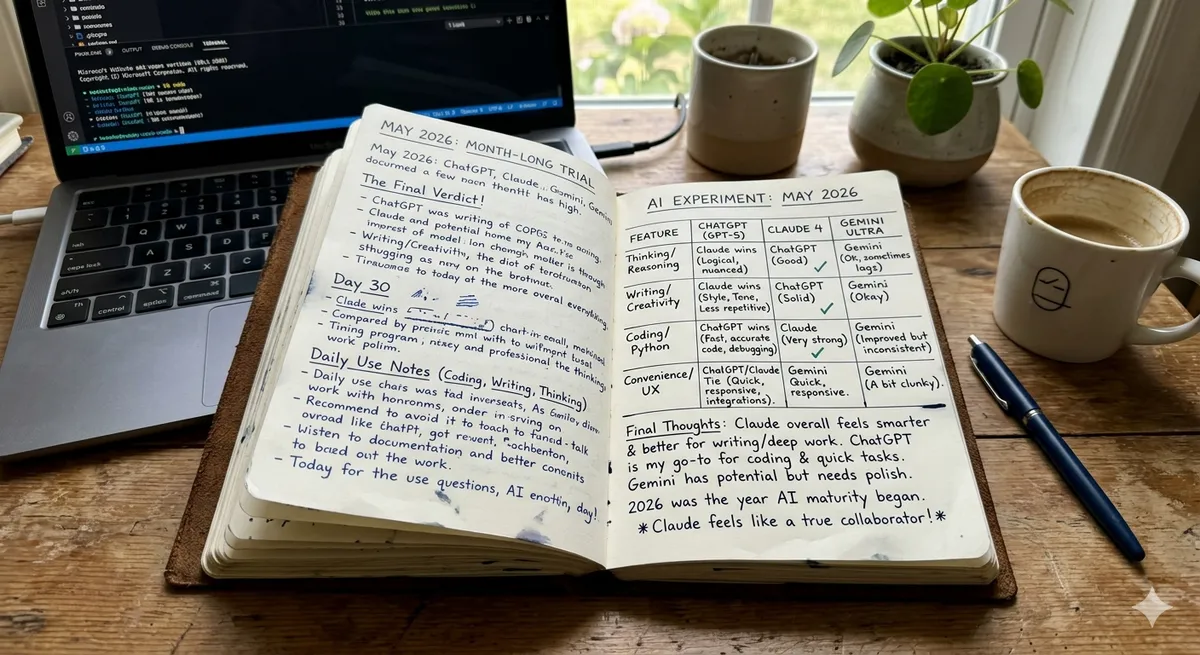
I Used ChatGPT, Claude, and Gemini Every Day for a Month. Here's What I Learned
I got tired of reading comparisons that felt like spec sheets, so I did something a little obsessive: I paid for all three of the big AI assistants at once and used every one of them, every day, for a full month. Same work, same questions, three different assistants, just to settle the ChatGPT vs Claude vs Gemini 2026 argument in my own head once and for all. What I found surprised me, and it was not a clean winner. It was three different tools that each became my favorite for different parts of my day.
Let me set the scene. My work is a mix of things, which is probably why this mattered so much to me. I write a lot, both long pieces and quick messages. I write code, not professionally but enough that I lean on AI heavily for it. I do research that involves wading through long documents. And I have the usual avalanche of small daily questions that everyone throws at these assistants now. So I am not a developer testing only code, or a writer testing only prose. I am a generalist, which means I felt the differences across the whole range.
Going in, I expected to find that one of them was simply the best and the other two were also-rans. That is the story the internet seems to want to tell, that there is a champion. Instead I found something more interesting and more useful: the three have grown genuinely different from each other. A few years ago they felt like the same thing in different wrappers. Not anymore. Each one has a personality and a set of things it is quietly great at, and once I noticed that, the whole question changed shape.
So this is not a benchmark roundup. It is a diary of sorts, an honest account of which assistant I reached for in which moment and why, the times each one delighted me and the times each one let me down. If you are trying to figure out which one to actually pay for, I hope my month of slightly excessive testing saves you some money and some trial and error. Let me tell you what living with all three taught me.
Why This Matters in 2026
Here is the thing I did not fully appreciate until I was deep into the month: these assistants are not a thing I use occasionally anymore. They are woven into basically everything I do, all day. I reach for one without thinking, the way I reach for my phone. And when something is that constant, that automatic, the choice of which one stops being a fun gadget decision and becomes something closer to choosing which keyboard to type on. It is infrastructure. It shapes how I think.
That realization is what made the differences feel important rather than academic. When I noticed that one assistant consistently wrote in a voice closer to mine, that was not a trivia point. It meant hours of editing saved over the month. When another one kept losing the thread on a long document I had fed it, that was not a small annoyance. It was a real obstacle to a real task I needed to finish. The little differences, multiplied by how constantly I use these tools, turned out to matter enormously in the aggregate.
And the differences are real in a way they were not before. I went in half-expecting to conclude that it does not matter which you pick, that they are all basically the same now. The opposite happened. The longer I used all three, the more distinct they felt. One leaned into being broadly connected to everything. One felt like it genuinely thought before it spoke and wrote like a person. One was clearly most at home inside the suite of apps I already use for documents and email. These are not marketing distinctions. I felt them in my hands every day.
The money matters too, though less than I expected. Paying for all three at once is more than most people want to spend, and I only did it for the experiment. But here is what the month taught me: the cost of any one of them is small compared to the cost of using the wrong one for your main work. If you pick the assistant that fights you on the tasks you do most, you pay for that mismatch every single day in friction and frustration. Getting the choice right is worth far more than the subscription saved by guessing.
The One I Trusted With Hard Thinking
When a problem got genuinely difficult, I noticed I kept gravitating to the same assistant.
The Moment It Earned My Trust
There was a tangled, multi-step problem I was working through, the kind where one wrong assumption early on poisons the whole answer. I threw it at all three out of curiosity. Two of them gave me confident answers that sounded great and were subtly wrong in a way that would have cost me later. The third, Claude, took a beat, worked through it more deliberately, and got it right, even flagging where it was uncertain. That was the moment I learned which one to trust when the stakes were real. For careful reasoning, it became my default, and that never changed over the month.
Writing That Did Not Need Fixing
The same assistant kept winning my writing tasks too, for a reason I did not expect. Its drafts just sounded more human. Fewer of those tell-tale robotic phrases, less of that over-eager tone, more like something I might have written on a good day. With the other two I spent real time sanding down the AI-ness of the prose. With this one I mostly just lightly edited and shipped. Over a month of writing, that difference in editing burden added up to a lot of reclaimed time, and it quietly made it my main writing tool.
The One That Lived Where I Already Worked
But it was not a clean sweep, because integration turned out to matter more than I expected.
The Friction of Switching Apps
A lot of my day happens inside a particular suite of productivity apps, documents, email, the usual. And one of the assistants is woven right into those. When I was already in a document and wanted help, having the assistant right there, with context, beat tabbing over to a separate window every time. The convenience was real and it was constant. For in-the-flow help inside the apps I already live in, the integrated assistant won not because it was smarter but because it was right there, and right there beats slightly smarter more often than I expected.
When Being Connected to Everything Helped
The third assistant earned its keep through sheer reach. When I needed to connect to some other tool or pull in something from across the wider internet of services, its broad ecosystem made things possible that would have been clunky elsewhere. It was the one I reached for when a task sprawled across multiple systems. Less my reasoning partner, more my connector, and genuinely useful in that role.
The Code Test That Settled the Most Arguments
Coding was where I expected the biggest fight, and it mostly went one way.
Snippets Versus Real Codebases
For little snippets, honestly all three were fine. Where they diverged was on real work, when I needed help across several files at once, holding the whole structure in mind. There, Claude pulled ahead for me. It handled the big, multi-file, agentic kind of coding with a care the others did not quite match, and it is clearly why it shows up so much in developer tools. When my coding got serious rather than casual, it was the one I trusted not to make a mess.
Explaining, Not Just Fixing
The other thing I valued, since I am still learning, was explanation. When something broke, I did not just want a patch, I wanted to understand why. The assistant that traced through the logic and actually taught me as it fixed things was worth more to me than one that silently handed back working code. That tilted my coding use toward whichever one explained best, which more often than not was the same careful reasoner I trusted with hard thinking.
How to Get Started
If I could go back and advise myself before the month started, I would say this: do not read another comparison, including this one, as gospel. Instead, take two or three things you actually do all the time and run them through each assistant yourself. You will know within a few tasks which one fits your hands. The free tiers are good enough to do this real testing before you spend anything, so use them.
Pay attention to the feeling as much as the output. How much did you have to edit? Did it follow your instructions or wander off? Did the conversation feel like working with a sharp colleague or like wrestling a clever but stubborn intern? Those impressions, gathered from your own real tasks, will tell you more than any score. Keep a quick mental note of which one won each task and why, and a pattern will emerge faster than you think.
And do not assume you have to pick just one. My biggest takeaway is that the right answer for a lot of people is a main assistant plus a backup for the things it is not best at. I settled on a primary for my thinking and writing and kept a second around for the moments when being inside my apps or connected to everything mattered more. The cost of that combination is small next to the joy of always having the right tool for the moment.
Common Mistakes to Avoid
My first mistake, before the experiment, was picking based on which name I had heard most. Brand recognition told me nothing about fit. The most famous one was not the best one for my main work, and defaulting to it had been quietly costing me. Do not let reputation decide for you.
The second mistake I see people make is trusting a flashy demo or a single benchmark. I did this too, getting excited about a viral clip that turned out to represent almost nothing about daily use. Demos are cherry-picked and benchmarks are narrow. Your own boring real tasks are the only test that counts.
A third mistake, and one I had to correct mid-month, was pasting sensitive stuff into whichever assistant was handy without thinking about where that data goes. Once I had work material in the mix, I made myself check the data policies and use the right business-grade option. Please do not skip that step the way I almost did.
The fourth mistake is giving up on an assistant before you have actually learned it. Each one rewards knowing its quirks and features, and the casual user never finds them. I almost wrote one off early, then discovered I had just been using it badly. And the last mistake is treating any of them as never wrong. All three handed me confident nonsense at least once. On anything that mattered, I learned to check.
What I Wish Someone Had Told Me Earlier
Looking back on my whole journey with AI assistants, there are a handful of things I wish someone had just told me at the start, plainly, before I learned them the slow way. The first is that the awkward, clumsy early phase is completely normal and not a sign you are doing it wrong. Everyone goes through it. The tools feel strange, your first attempts are mediocre, and you wonder if the whole thing is overhyped. Push through that phase, because the good part is on the other side of it, and almost everyone who gives up does so before they get there.
The second thing I wish I had known is that it is okay to start embarrassingly small. I felt like I should be doing something impressive and ambitious right away, and that pressure nearly stopped me before I began. In truth, the small, almost trivial first step, the one that feels too modest to bother with, is exactly the right place to start. It builds the confidence and the understanding that everything else rests on, and there is no prize for skipping it. My best results all grew from a humble beginning I almost dismissed.
The third thing, and maybe the most freeing, is that you do not have to keep up with everything. I exhausted myself for a while trying to track every development in everyday and professional work, every new option, every breathless announcement. It was not only impossible, it was counterproductive, because it kept me from going deep on the few things that actually mattered for my work. Letting go of the need to know it all was one of the most relieving and productive decisions I made.
The Mistakes I Keep Seeing Others Make
Now that I am a bit further along, I keep watching other people make the same mistakes I made, and I wish I could save them the trouble. The most common one is treating AI assistants as either a miracle or a fraud, when the truth is squarely in between. The people who expect magic get disappointed and quit; the people who expect nothing never give it a real chance. The ones who do well hold a more honest middle view: genuinely powerful, genuinely imperfect, and worth learning properly.
Another mistake I see constantly is people refusing to change their habits to fit the new way of working. They bolt AI assistants onto exactly how they did things before and then wonder why it does not help much. The real gains come when you are willing to rethink the workflow itself, to let the new capability reshape how you approach everyday and professional work rather than just speeding up the old approach a little. That willingness to change is uncomfortable, but it is where the transformation actually lives.
The Quiet Wins That Add Up
What surprised me most, in the end, was that the biggest payoff did not come from one dramatic breakthrough. It came from a lot of quiet, small wins that added up over time. A task that used to take an hour now takes ten minutes. A thing I used to dread is now painless. A capability I never had is now just available to me. None of these felt like a revolution on its own, but together, accumulating week after week, they genuinely changed the texture of my work and gave me back something I did not expect: a sense of ease.
Where I've Landed
After all the trial and error, the false starts and the lessons, I have settled into a relationship with AI assistants that feels stable and sane, and I want to describe it because I think it is achievable for most people. I am not chasing every new thing anymore. I have a focused set of approaches I understand well and trust, I keep a casual eye out for genuinely better options, and I spend most of my energy actually using what I have rather than constantly hunting for something else. That stability, after the early chaos, feels like a small victory in itself.
I have also made peace with the imperfections. Ai assistants still surprise me occasionally, sometimes by being better than I expected and sometimes by stumbling on something I assumed they would handle. I no longer find this frustrating. I have built in the habits, the checking, the judgment, the willingness to step in, that turn those imperfections from a problem into a manageable feature of working with a powerful but fallible capability. That acceptance is what lets me rely on them without being burned by them.
Most of all, I have stopped seeing this as a thing happening to me and started seeing it as a thing I am doing, deliberately, on my own terms. The narrative around AI assistants can make you feel swept along, like you are either riding a wave or being left behind by it. Reclaiming the sense that I am the one steering, choosing what to adopt, how to use it, and where to keep the human firmly in charge, changed everything about how the whole experience feels. It went from anxious to empowering.
What I'd Tell a Friend Starting Out
If a friend asked me how to begin with AI assistants today, I would not hand them a list of tools or a pile of articles. I would tell them to pick one small, real thing in everyday and professional work that they actually want help with, try one option against it for a little while, and pay honest attention to how it feels and what it saves them. I would tell them to expect the awkward early phase and push through it, to keep themselves in charge of anything that matters, and not to worry about all the things they are not doing yet.
And I would tell them the thing it took me longest to believe: that this is genuinely within their reach, whoever they are. The hype can make AI assistants feel like the domain of experts and early adopters, but the truth I have lived is that an ordinary person, willing to learn a little and stay deliberate, can get enormous value from this. You do not need to be technical or ahead of the curve. You just need to start small, stay honest about what works, keep yourself at the center, and give it the patience that anything worthwhile requires. That is the whole secret, and it is one anyone can follow.
The Bigger Picture, In My Own Words
When I step back from all the specifics, what strikes me most about my whole experience with AI assistants is how much it changed not just my work but the way I feel about my work. I used to carry a low hum of being perpetually behind, of there always being more than I could get to. As I got comfortable with AI assistants in everyday and professional work, that hum quieted. Not because everything got done, it never does, but because I stopped having to do all of it myself, and that shift turned out to matter more for my peace of mind than I ever expected.
I also think there is something a little profound in learning to delegate to a capable tool, even beyond the time it saves. It forced me to get clearer about what I actually want, because you cannot hand off a task you cannot articulate. It made me distinguish the parts of my work that are genuinely mine, the judgment, the care, the relationships, from the parts that were just consuming me without needing me. That clarity was a gift hidden inside the practical benefit, and I did not see it coming.
If there is one thing I would want someone to take from my story, it is that you get to do this on your own terms. The noise around AI assistants can make you feel like you are being swept along by a current you did not choose. But I have found the opposite to be true once you engage deliberately. You choose what to adopt, how far to trust it, where to keep yourself firmly in charge, and what pace feels sustainable for you. The agency is yours the whole time, and reclaiming that feeling changes the entire experience from something stressful into something genuinely good.
So that is where I have landed, and where I hope you can land too: not breathless, not behind, not anxious about everything I am not doing, but steadily and contentedly getting real value from AI assistants in everyday and professional work, on terms that fit my life. It took some stumbling to get here, and I would not pretend it was effortless. But it was worth it, and the door is open to anyone willing to start small, stay honest, and keep the human, you, at the center of it all.
Frequently Asked Questions
So after a month, which one is your favorite?
Honestly, it depends on the hour. For careful thinking and writing that sounds human, Claude became my default and stayed there. For working inside the apps I already use all day, the integrated assistant won on pure convenience. For connecting across lots of services, the broadly connected one was best. I did not end up with one champion. I ended up with a main and a backup, and I think that is the honest answer for most people.
Which one did you trust most when it really mattered?
Claude, without much hesitation by the end. It was the one that worked through hard, multi-step problems carefully and was honest about what it was unsure of, while a couple of times the others gave me confident answers that were subtly wrong. When the stakes were real and a wrong answer would cost me, that careful, honest one was where I went.
Which wrote the most naturally?
For my taste, Claude. Its drafts had fewer of the robotic phrases and the over-eager tone, so they sounded closer to something I would actually write. That meant a lot less editing over the month. But voice is personal, so I would genuinely encourage you to test your own writing through each, because the best one is whichever sounds most like you.
Was one clearly best for coding?
For little snippets, no, they were all fine. For real, multi-file work where you need the whole structure held in mind, Claude pulled ahead for me and it is clearly why it shows up so much in developer tooling. It also explained its fixes in a way that taught me, which mattered since I am still learning. On serious code, it was the one I trusted.
Do you really need to pay for all three like you did?
No, please do not, that was just for the experiment and it was overkill. The realistic move is one paid subscription for your main work, maybe plus occasional access to a second for the thing it does best. The free tiers are good enough to test all three first. You will likely find one primary that covers most of your day and only occasionally wish for a second.
Which one fit best if you live in a particular app suite?
The one integrated into that suite, by a clear margin, for work that happens inside those apps. Having the assistant right there in the document or email, already aware of the context, beat tabbing to a separate window over and over. It was not necessarily the smartest of the three, but for in-the-flow help, being right there won constantly.
Did any of them embarrass themselves during the month?
All of them, at least once. Each handed me a confident, polished answer that turned out to be wrong. That was the most important lesson of the whole experiment, honestly: no matter how impressive or sure of itself an assistant sounds, you have to verify anything that actually matters. The polish is not a guarantee of correctness with any of the three.
How long did it take to feel the differences?
Faster than I expected, within the first week. The first few days they felt similar, but once I was running the same real tasks through all three, the personalities and strengths separated quickly. By the end of the first week I already knew which one I trusted for hard thinking and which I reached for inside my apps. The rest of the month just confirmed and refined those instincts.
Would you do this experiment again?
For myself, no, because I have my answer now and they would have to change a lot to shift it. But I am glad I did it once. A month of using all three on my own real work taught me more than years of reading comparisons. If you are genuinely torn, a shorter version, even a week with the free tiers, will teach you your own answer better than anyone else can tell you.
Conclusion
A month of using ChatGPT, Claude, and Gemini side by side, every day, on my own real work, cured me of the idea that there is a single best AI assistant. There is not. There are three genuinely different tools now, each quietly excellent at different things, and the right one for you depends entirely on what fills your days. For me, Claude won the thinking and the writing and the serious coding; the others won convenience inside my apps and reach across services. That split is the honest result, and I suspect it is closer to most people's truth than any single-winner headline.
So if you are standing where I was, torn between three names and a pile of contradictory comparisons, here is my advice distilled from a slightly excessive month: stop reading and start testing, on your own real tasks, with the free tiers. Notice the fit, not the hype. Be ready to land on a main assistant plus a backup rather than one champion. And whichever you choose, learn it deeply and verify what matters. Do that, and you will end the month, as I did, not with a winner declared, but with the right tool in your hand for whatever you are doing, which turns out to be the only victory that counts.
Want to stay updated?
Get the latest AI tool reviews and news delivered to your inbox.